Applies to: Wowza Video 2.0
Wowza Video is a cloud streaming platform for businesses and developers who need live streaming, video on demand (VOD), and content management in a single subscription. It accepts video from nearly any encoder or IP camera, transcodes it in the cloud, and delivers adaptive bitrate streams to a customizable player on virtually any device. This article covers what's included in a Wowza Video subscription and how each capability works. To learn more or to purchase, contact the Wowza sales team or visit the Wowza Video product page.
A Wowza Video subscription includes:
- Live streaming with robust customization options
- Wowza Flowplayer configuration, including support for multiple players per account
- VOD capabilities: chapter markers, subtitles, automated transcriptions, file management, video editing, and animated preview clips
- Content management with metadata, tags, and categories
- Playlists for organizing VOD content
- Advertising integration for monetization
- Analytics covering viewer behavior, content performance, and platform engagement
For information on the Wowza Video free trial, see Wowza Video free trial.
Wowza Video accepts video from nearly any encoder or IP camera, transcodes that video in the cloud, and delivers a high-quality stream in multiple bitrates to a customizable player on virtually any device. You don't need to purchase hardware, maintain servers, or run software locally. You pay only for the resources you use and can broadcast to audiences of any size at any time.
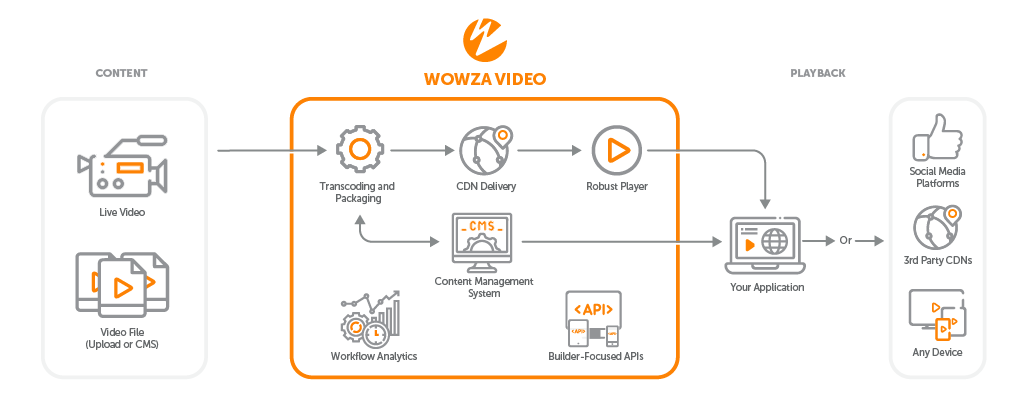
Advanced settings let you receive live streams from selected Wowza Video sources and send streams to additional targets, providing the control and scalability required for large-scale deployments. Access raw streaming data via the Wowza Video REST API 2.0 and incorporate external services as needed.
Wowza Video gives you several live stream types to choose from, each with its own customization options. For example, you can go live immediately with a default configuration or build a custom stream with specific encoder settings, bitrate profiles, and player assignments. For more information, see Overview of the live stream setup pages in Wowza Video.
Wowza Video lets you create and configure multiple players, each with its own design and playback settings. For example, you can set up one player for live streams and a separate player for your VOD library. For more information, see Player configurations in Wowza Video.
Wowza Video lets you build an online video library that your audience can watch at any time. Upload videos for automatic encoding and captioning, or record your live streams directly to your library. From there, you can customize videos with poster images, set up ads for monetization, and manage playlists and publishing schedules. Videos are delivered through Wowza Flowplayer with adaptive bitrate streaming. For more information, see Get started with videos in Wowza Video.
Playlists let you group videos so they play sequentially, which is useful for training series, episodic content, or any ordered collection. For more information, see Playlist setup page in Wowza Video.
Categories let you arrange videos by theme, topic, or genre to power dynamic playlists and recommendations. For more information, see Categories page in Wowza Video.
Wowza Video supports client-side advertising integration so you can serve ads through your video player and generate revenue from ad impressions. For more information, see Get started with advertising in Wowza Video.
Wowza Video analytics give you insight into how your audience interacts with your content: viewer counts, engagement depth, and content popularity. Use these metrics to understand viewer preferences and adjust your streaming strategy. For more information, see Analytics in Wowza Video.
The Wowza Video platform is a browser-based interface for managing live streams, videos, players, and analytics. All primary sections are accessible from the left navigation menu.
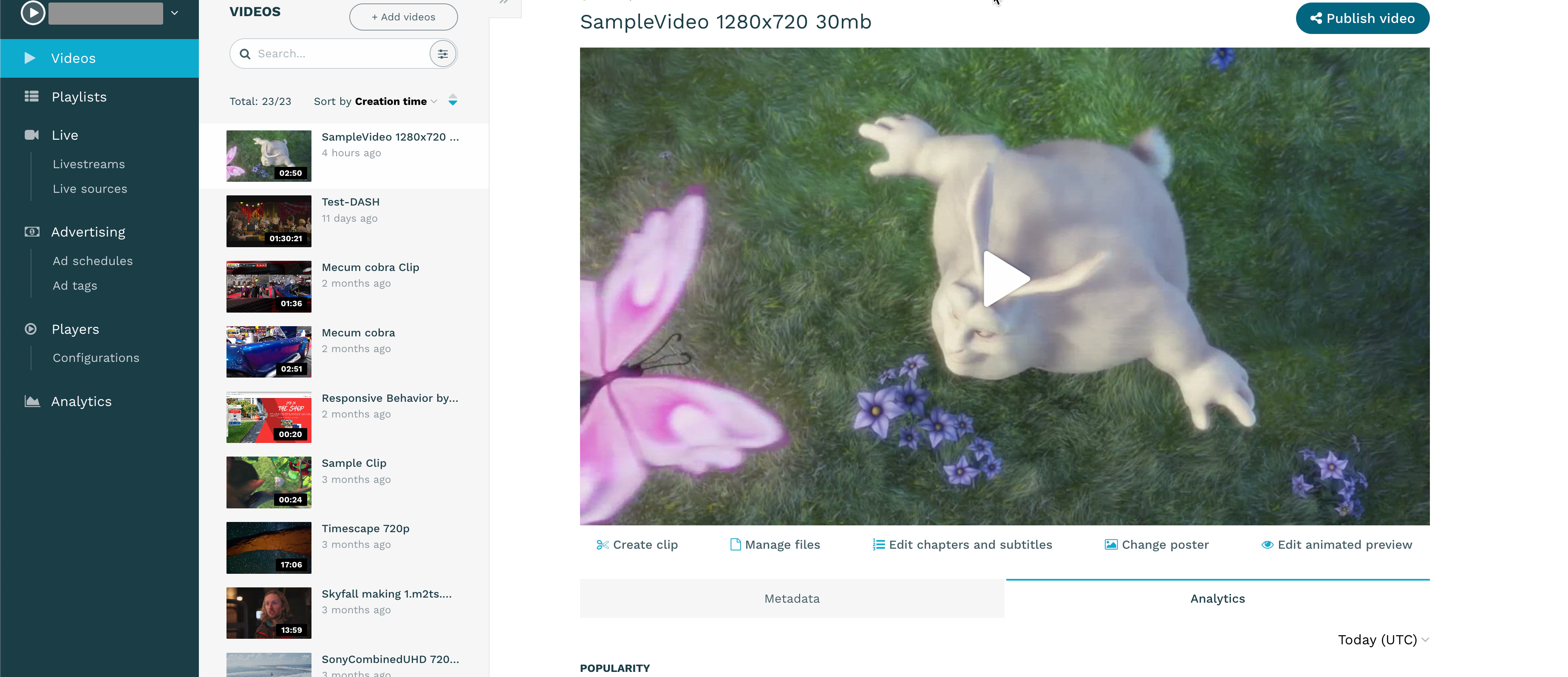
- Log in at app.wowza.com using your Wowza Video credentials. The left navigation menu appears after login.
- Click Videos to access your video library, where you can upload and manage VOD content.
- Click Player Configurations to access your players, where you can configure player design and playback settings.
- Click Live Streams to create and manage live streams.
- Click Advertising to create ad tags and integrate advertisements with your player.
- Click Analytics to view live stream and video performance data, including engagement metrics and content consumption patterns.
The Wowza Video free trial provides 30 consecutive days of access to the full Wowza Video platform, including the Wowza Video REST API 2.0. To sign up, see Wowza Video free trial sign-up and limitations.